SegoraFeatures

The building blocks

One platform between your systems.
Three blocks. No integration code.

Map data between different structures, define how messages move between systems, and run integrations through secure endpoints, all configured visually. Three blocks do the work: a design studio, a delivery engine, and operations you can trust.

Your systems send

  • Clinical and hospital systems
  • Lab and pharmacy systems
  • Legacy and in-house apps
  • Mobile and web applications

Segora platform

Design studio

Turn one system’s data into another’s.

Multiple structuresBuilt-in support for FHIR® R4 and R5 and OpenMRS. Any other JSON or XML structure, whatever standard it follows, can be loaded from a sample and mapped.
AI-assisted mappingSuggestions from field names and structure, without sending your messages to the AI.
Value-set mappingMap codes between systems once. For FHIR® and OpenMRS, Segora loads the code lists for you.
InspectSee the exact result before anything goes live.
Reuse and shareClone a workflow or a pipeline under a new name, and import a mapping someone shared with you as a file into any project.
Your own AI accountAI features run on your organization’s own Anthropic or OpenAI API key (Claude or ChatGPT). Add it in Settings and choose the model.

Delivery engine

Get every message where it must go.

WorkflowsOne message, through a chain of systems or copied to others; pushed to Segora, or fetched on a schedule.
PipelinesShared routes built once, reused by every workflow.
Segora mediatorChecks a system’s response against your rules, can convert it, and passes it on.
Validate firstSwitch it on for a FHIR® server target: each message is checked with the server’s $validate first, and one that fails is not delivered.
Answers in your own structureAdd a reverse transform, and a read (GET) comes back the way the calling system understands it: the target’s answer is translated back into the source’s structure with the same mapping, in reverse.

Operations and trust

Run it with confidence.

Endpoints and sign-inA dedicated endpoint for each workflow, protected by API keys; targets reached with Basic, API keys or OAuth2.
Activity and alertsEvery request and every system at a glance, an email when something starts failing, and every change to a workflow, pipeline or mapping kept for 24 months.
Content not keptMessages are processed in memory and their content is not kept. Only an activity record is, for billing and monitoring.
Your own spaceEach organization private and isolated.
Ecosystem mapEvery system your workflows reach on one live map, coloured by how its deliveries are going, with its requests, failures and success rate.
Who may callLimit the addresses allowed to call your workflows, on top of their API keys, and replace a key in one step.
SpecificationsEvery workflow documented as you save it: a sequence diagram, the mapping rules, example messages and the value sets used. Share it as Word or PDF.

Systems you reach

  • Shared health records
  • Client and facility registries
  • Your interoperability layer
  • Warehouses and reporting
Faster to liveConfigure and test instead of commissioning custom code.
Owned by your teamThe people who know the data build and update the mappings themselves, without waiting for developers.
Standards built inWork with FHIR® profiles, value sets and server-side validation.
Not only healthAny system, any sector, wherever data has to move.

What it looks like

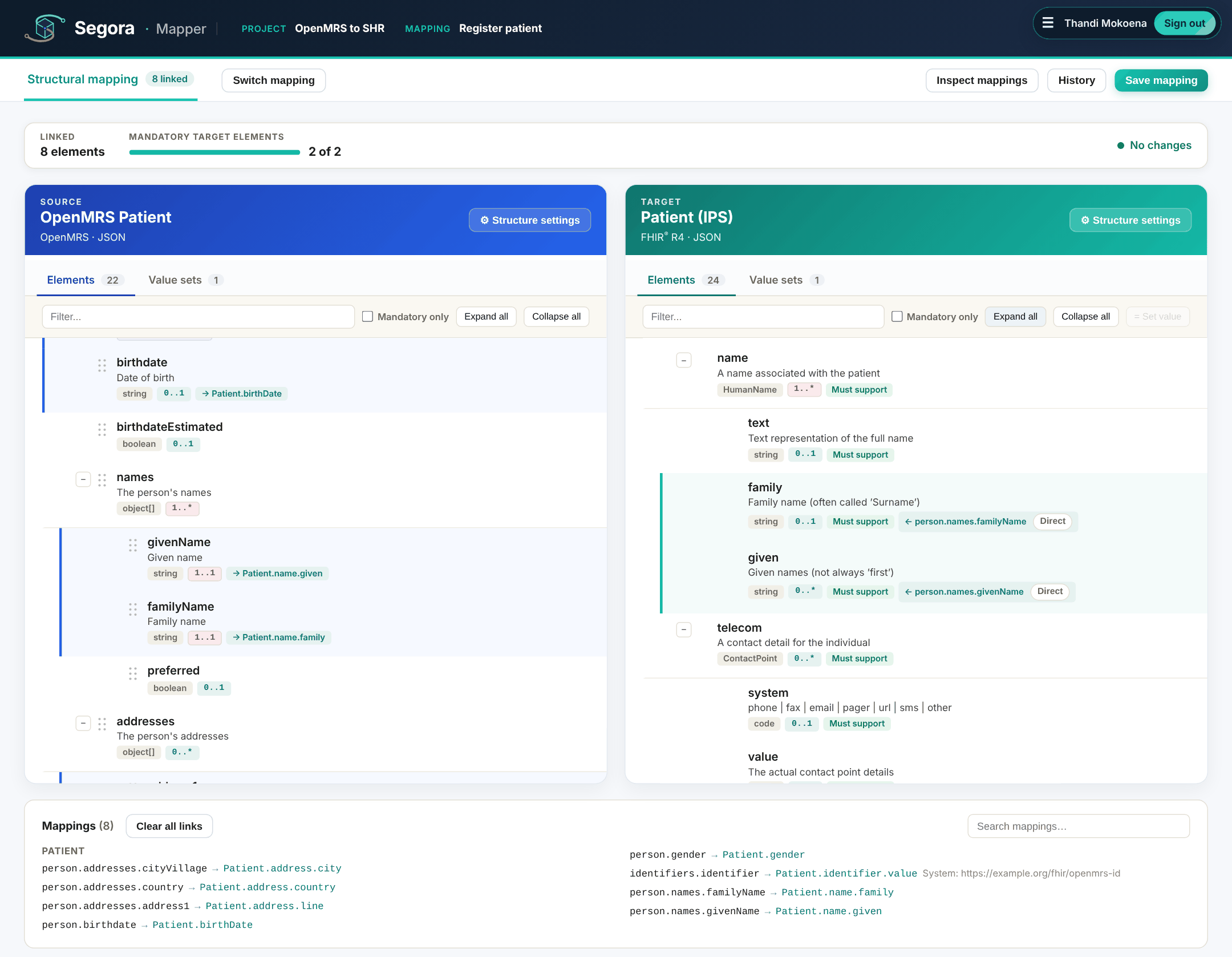
The Mapper: source and target structures side by side, with linked fields
Design studio. Source and target side by side, fields linked.
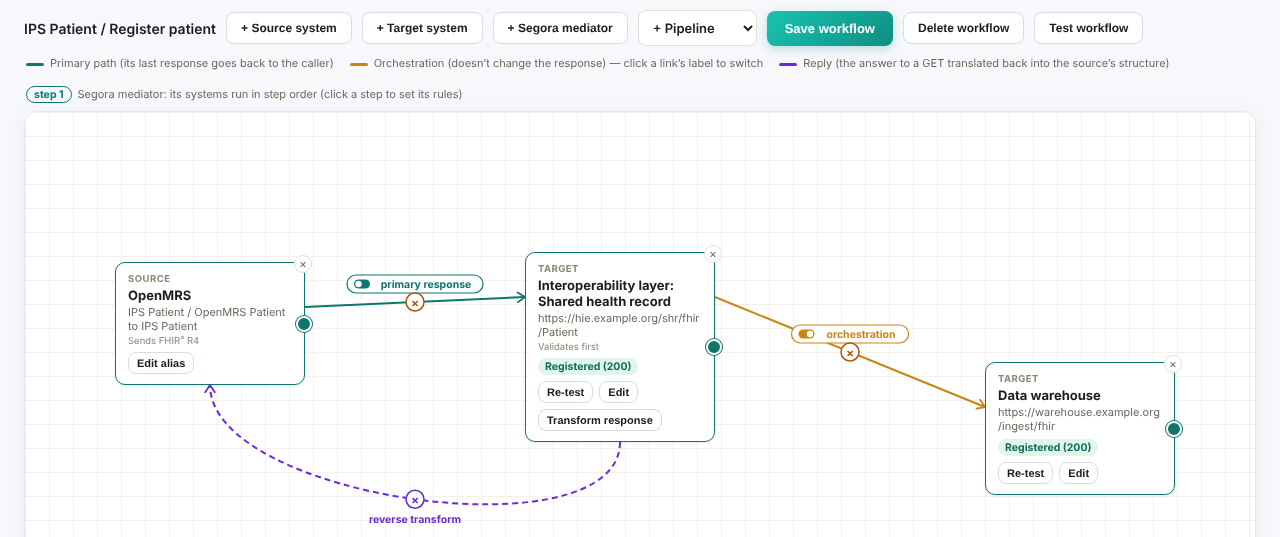
A workflow: OpenMRS sends to the interoperability layer, with an orchestration to a data warehouse
Delivery engine. A source, its primary target and an orchestration.
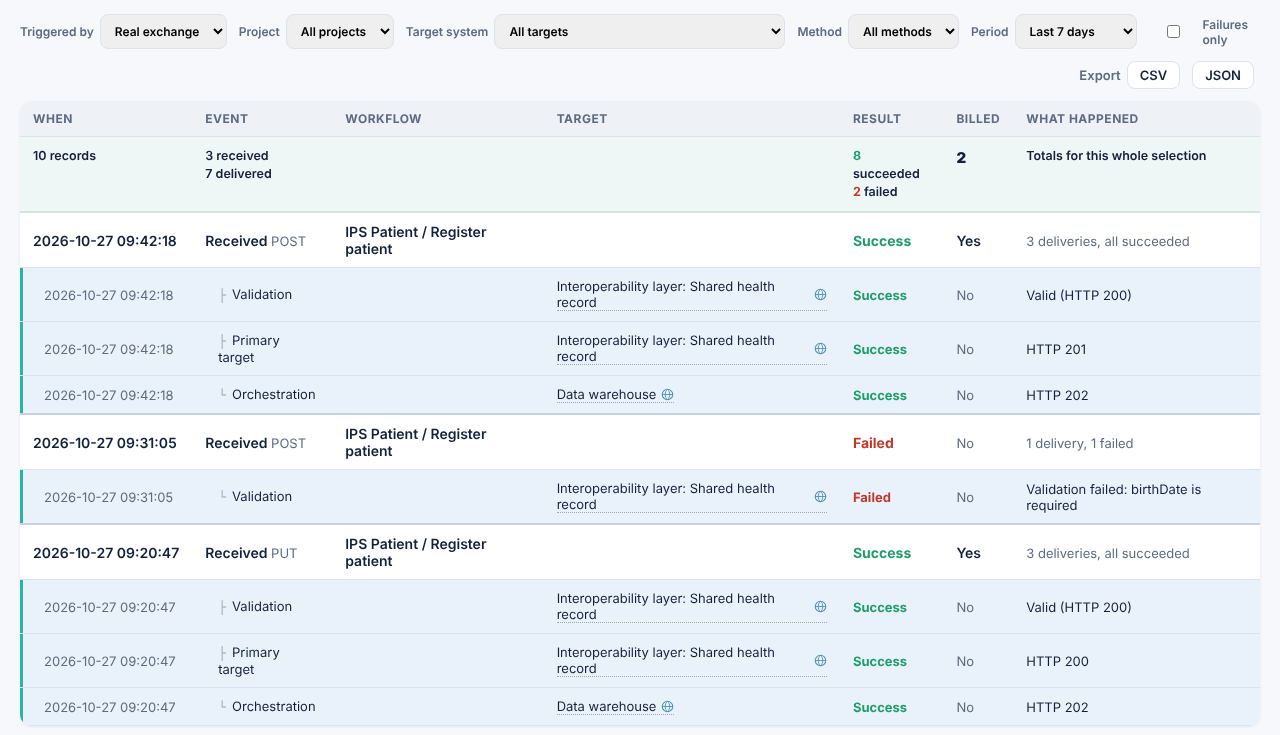
The activity log: each request with the systems it reached and the result
Operations. Every request and the systems it reached, never its content.

Operations and trust

Specifications: the documentation writes itself

Every workflow comes with its own specification, so the documentation never falls behind the integration. Segora brings it up to date whenever the workflow, a pipeline it uses or one of its mappings is saved. Nobody writes it, and nobody has to remember to update it.

What is in it

  • Sequence diagram. Every system a message reaches, in order: validation, the mediator’s rules, orchestrations and the answer to the caller. Download it as SVG, or copy its PlantUML source.
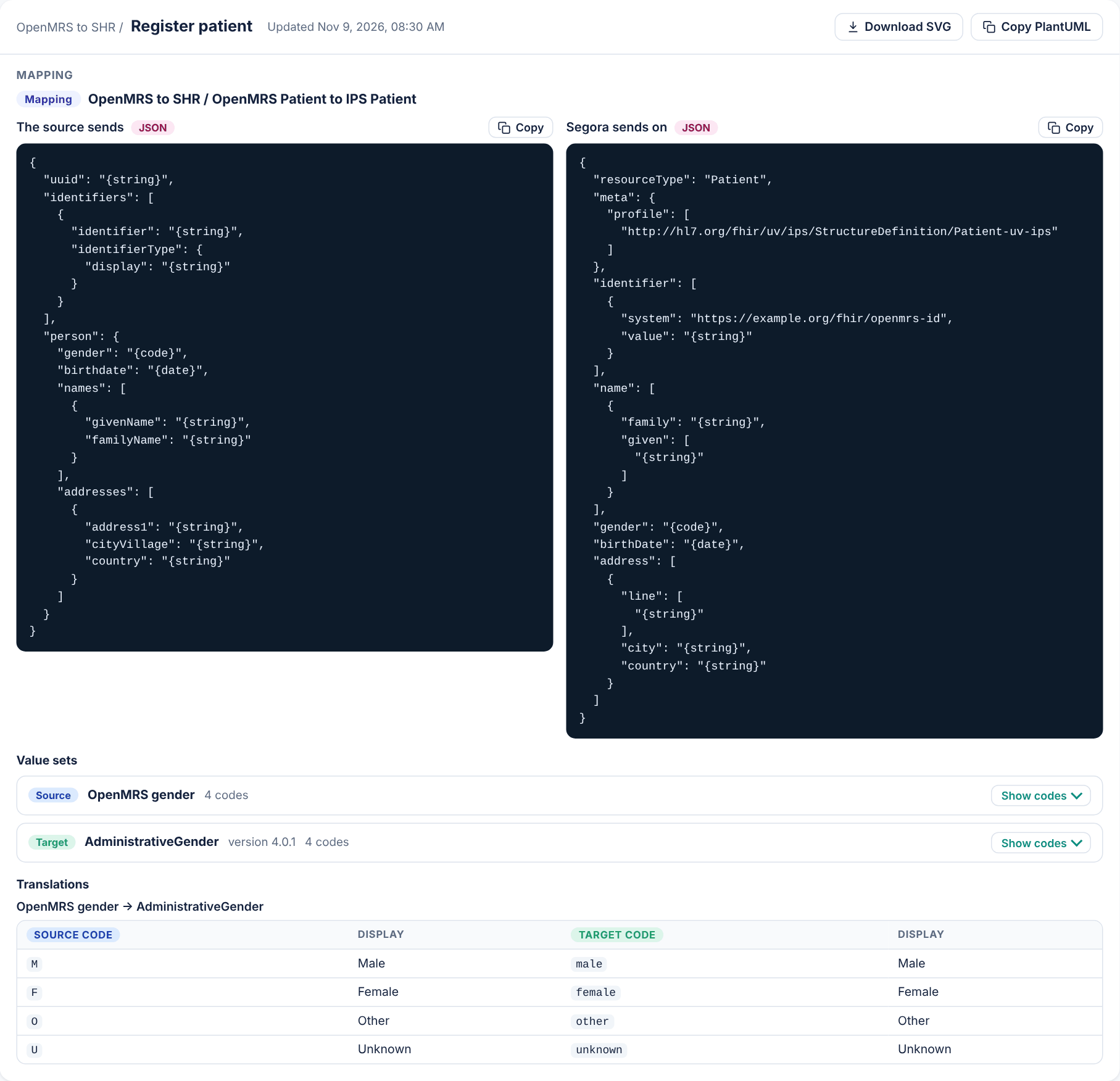
  • Example messages. What the source sends and what Segora sends on, with each value shown by its type, such as {string} or {date}. Never real data.
  • Value sets and code translations. The code lists each mapping uses, and how each source code becomes a target code.
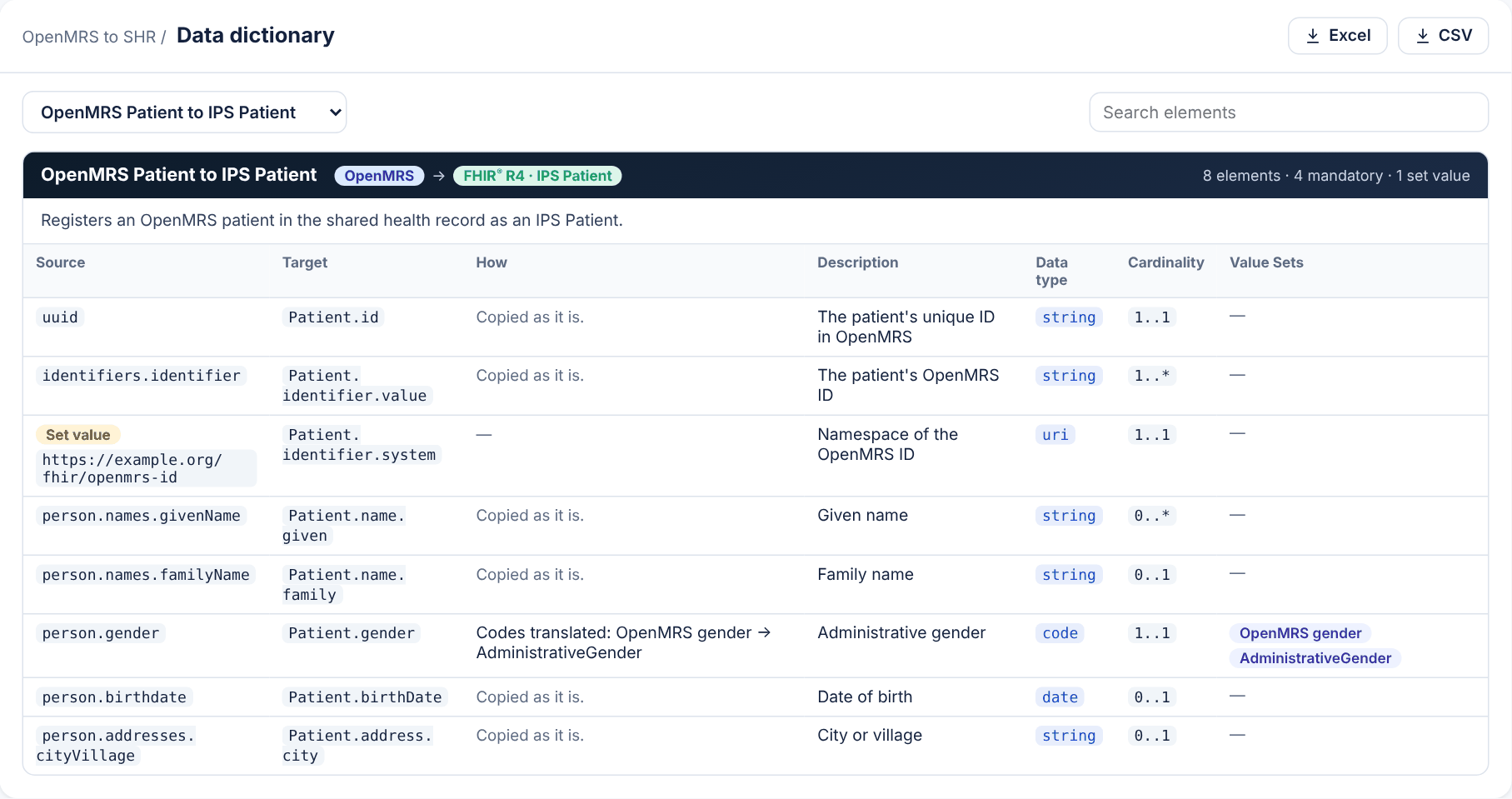
  • Data dictionary. Every element a mapping reads and writes: where it comes from and where it goes, how it is changed on the way, its description, data type, cardinality and value sets. Download it as Excel or CSV.

Why it matters

  • The other side knows what to expect. Give the team behind a receiving system the exact message structure and codes before the first message arrives.
  • Agreed, then signed off. Download it as a Word document to comment on and pass around, or save it as a PDF.
  • Always what is configured. It is made from what is saved, so it cannot drift away from the integration it describes.
Where to find it, step by step

A workflow's specification: what OpenMRS sends and the IPS Patient Segora sends on, each value shown by its type, with the value sets and code translations
A mapping in its specification. What the source sends and what Segora sends on, the value sets and the code translations.
The data dictionary of a mapping: each element's source, target, how it is changed, description, data type, cardinality and value sets
The data dictionary. Every element, ready to download as Excel or CSV.

Segora Community

Mappings reviewed by implementers

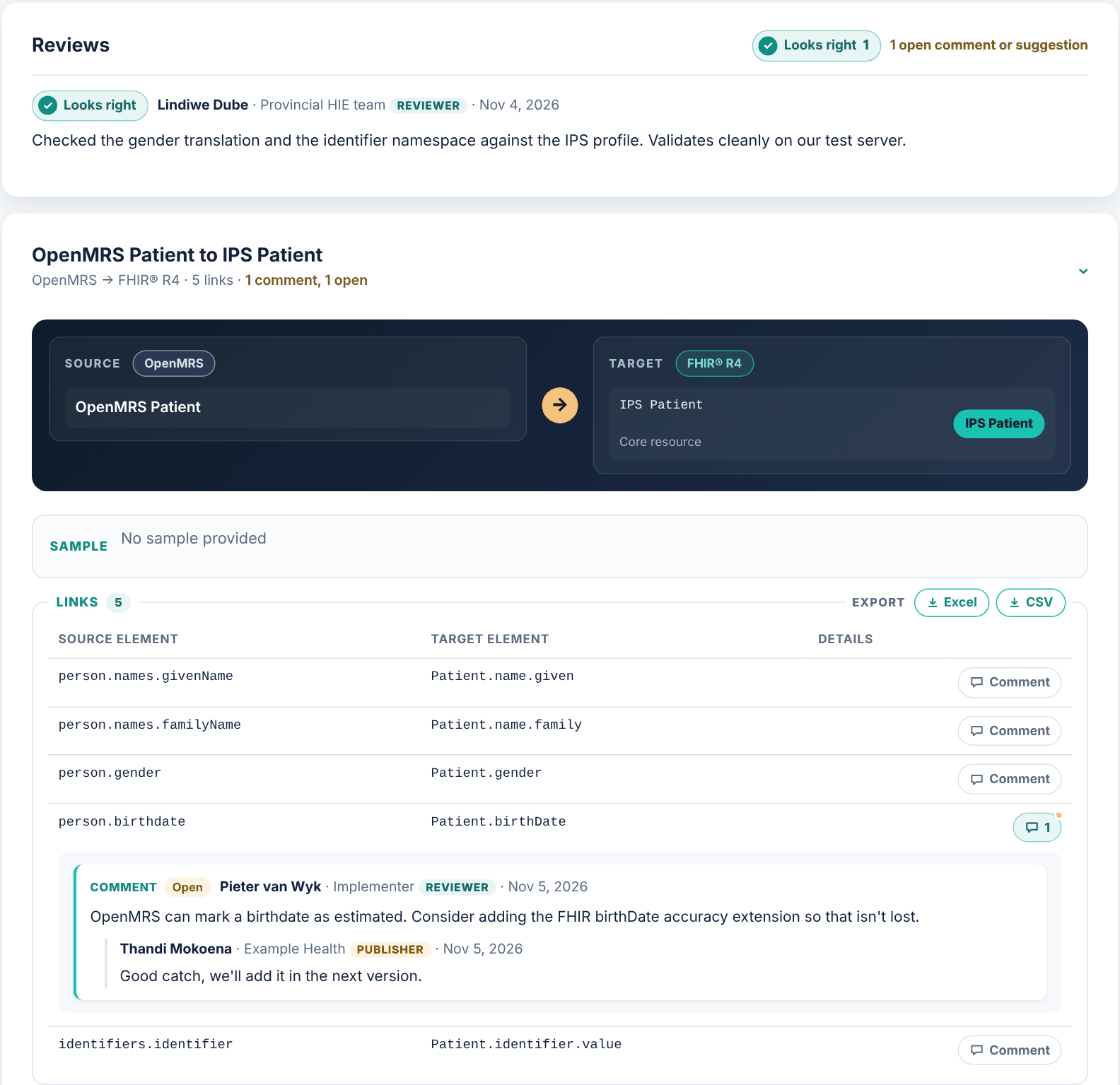
Publish a project’s mappings to the Segora Community and have other implementers and subject-matter experts check them. Reviewers give a verdict on the whole (Looks right, Needs changes or Has problems), comment on or suggest a change to one link or one value set, and you reply where they wrote.

  • Always current. Each save in Segora updates the published mappings, so reviewers see what you run.
  • Only what is safe leaves. The mappings and the shape of their structures are published, under CC BY 4.0. Credentials, sign-in settings, addresses on your own network and the values of any sample message your structures were built from stay behind.
  • Learn from others. Browse what other organizations have published, and open discussions of your own on any topic.
Visit the Community

Published mappings in the Segora Community: a reviewer's Looks right verdict, and a comment on one link with the publisher's reply
A review in progress. A reviewer’s verdict, and a comment on one link with the publisher’s reply.

Works with what you already run

Segora covers the core of integration work: mapping, transformation, validation, routing, delivery and response handling. Its mediator can check a system’s response against your rules and convert it before passing it on.


Where an integration has to combine information from several systems, that logic can stay in your existing interoperability layer. For example, a client registry may return patient identifiers that must be added to the request sent to a shared health record. Segora sends the message to the endpoint your layer exposes and handles the mapping and delivery around it, so nothing already in place has to be replaced. Segora is not a data store or a place for custom integration code.

See the blocks at work

Follow one example from structures to a live endpoint.

HL7® and FHIR® are the registered trademarks of Health Level Seven International. Segora is not affiliated with or endorsed by HL7®.